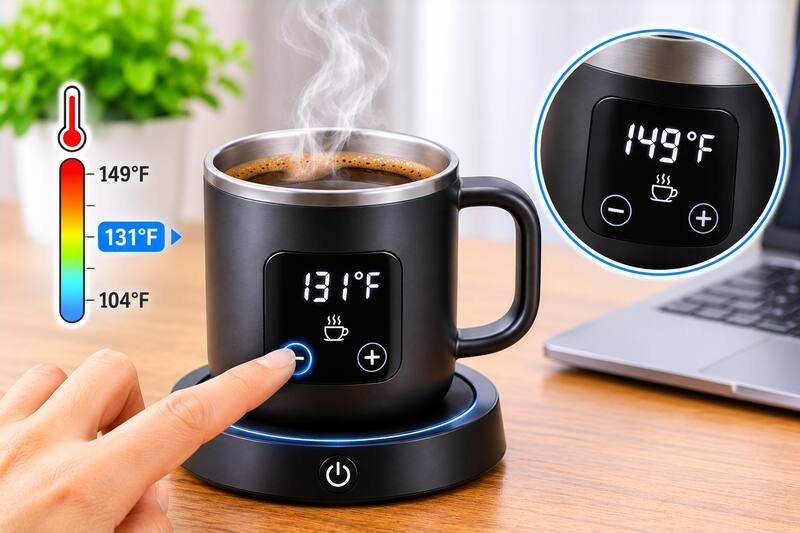
A temperature control mug keeps your coffee or tea at a set temperature, so the last sip tastes as good as the first. Instead of slowly cooling like a regular mug, it uses a built-in heater, a battery, and a temperature sensor to hold your drink steady. But how exactly does a temperature control mug work, how long does the battery last, and is it better than a simple mug warmer? In this guide, we explain the technology in plain language, compare popular models by their published specs, and share independent test results from CNN Underscored and Bob Vila.
Key Takeaways
- First, a temperature control mug combines a heating element, a rechargeable lithium battery, and a sensor that reads the drink’s temperature.
- Most models hold drinks between about 113°F and 150°F. For example, Ember offers 120°F to 145°F, while Nextmug offers 130°F, 140°F, and 150°F presets.
- Battery life varies widely. Ember lists up to 1.5 hours for its 10-ounce Mug 2, while CNN measured a Nextmug at 2 hours 55 minutes with its lid.
- These mugs maintain heat better than they reheat. In CNN’s test, the Ember Mug 2 raised coffee by about 10°F in 10 minutes.
- Finally, a 2008 study in the journal Burns found an optimal coffee drinking temperature of about 136°F, which most of these mugs can hold.
What Is a Temperature Control Mug?
A temperature control mug is a smart mug that actively holds your drink at a chosen temperature. You pour in hot coffee or tea, choose a setting, and the mug keeps the drink there until the battery runs low or you set it back on its charging coaster. As a result, you get a consistent temperature instead of a slow slide from too hot to lukewarm.
This is different from an insulated mug. An insulated tumbler only slows heat loss, so the drink still cools over time. By contrast, a temperature control mug adds heat whenever the drink falls below your setting. It is also different from a mug warmer plate, which heats only the bottom of a regular mug and cannot measure the drink itself.
How a Temperature Control Mug Works
Although designs vary by brand, most temperature control mugs share four main parts. Here is how they work together, step by step.
1. The Temperature Sensor
First, a sensor in the base or wall measures the temperature of the liquid. This is the key difference from a plate warmer. Because the mug knows how hot the drink actually is, it can decide when to heat and when to rest.
2. The Heating Element
Next, a thin heating element warms the drink when the sensor detects that it has cooled below your setting. When the drink is already too hot, the heater stays off and lets the coffee cool naturally to your target. In other words, it works like a small thermostat built into your mug.
3. The Rechargeable Battery
Then, a lithium battery powers the heater when the mug is off its base. Battery size limits run time. For example, the Happiness self-heating mug lists a 4,000 mAh battery, and the VFZO travel mug lists 4,000 mAh as well. At a typical 3.7 volts, that is roughly 14.8 watt-hours of stored energy, based on our estimate.
4. The Charging Coaster
Finally, a charging coaster recharges the battery and, on most models, keeps the drink warm indefinitely while the mug sits on it. So, at your desk, the mug can run all day, while away from the desk it runs on battery.
Smart Features You Will See
- App control: Ember lets you set an exact temperature, save presets, and get notifications in its app. Similarly, Kepwam offers degree-by-degree app control on its T1.
- Button presets: Nextmug, PUSEE, and Supsonic use one-button presets instead of an app.
- Auto wake and sleep: Many mugs wake when they sense hot liquid and sleep when empty or idle. For instance, Ember sleeps after 2 hours of inactivity.
- Beverage detection: VSITOO says its S3 starts heating automatically when you pour.
- Dry-heat protection: Supsonic lists dry-boil protection and a 2-hour auto shut-off.
- Water resistance: Ember’s mugs are IPX7 rated, meaning they can be submerged for hand washing.
Popular Temperature Control Mugs Compared
To illustrate, here is how popular models compare, based on their official or Amazon listings checked in November 2026.
| Model | Size | Temperature Control | Listed Battery |
|---|---|---|---|
| Ember Mug 2 | 10 oz | 120–145°F via app | Up to 1.5 hr |
| Ember Tumbler 2 | 16 oz | 125–145°F presets | 3+ hr with lid |
| Nextmug | 14 oz | 130, 140, 150°F | Not stated as one figure |
| Kepwam T1 | 16 oz | 113, 131, 149°F plus app | Up to 4.7 hr |
| VSITOO S3 | 12 oz | 1°F steps | 2–4 hr |
| THERMACUP Premium | Not in title | Custom heat control | Up to 8 hr |
Keep in mind, however, that battery claims usually assume a closed lid and a low setting, so real results are often shorter.
What Independent Tests Show

Photo: DeaPeaJay via Flickr (CC BY-SA 2.0).
Independent testers have measured how these mugs really perform. In CNN Underscored’s three-week test, the Ember Mug 2 raised coffee by about 10°F in 10 minutes at a 130°F setting. However, it did not always hit the exact target, even after an hour, and without a lid it dropped 3°F to 5°F past the one-hour mark. Meanwhile, Nextmug with its lid rose 20°F in 10 minutes, reached 130°F within 15 minutes, and held it for at least an hour.
Bob Vila’s testers found similar patterns. For example, Nextmug lasted about 5 hours on Warm with its lid compared with about 2 hours without it, and a Thermacup heated room-temperature liquid to 140°F in about 40 minutes. In short, these mugs hold temperature well, but they heat slowly from cold, and lids make a huge difference.
Video: BottlePro compares Ember, Nextmug, and Kepwam smart mugs.
What Temperature Should You Set?
Most people do not need extreme heat. In a 2008 study in the journal Burns, Fredericka Brown and Kenneth Diller cited consumer data showing a preferred drinking temperature of 140°F, plus or minus 15°F, and calculated an optimal temperature of about 136°F (PubMed). Ember’s default of 135°F lands almost exactly there.
Lower settings also save battery. For instance, Bob Vila measured Nextmug at about 5 hours on Warm (130°F) but about 3 hours on Piping (150°F), both with the lid. So, if battery life matters, choose a moderate setting.
Temperature Control Mug vs. Mug Warmer vs. Insulated Tumbler
| Feature | Temp Control Mug | Mug Warmer Plate | Insulated Tumbler |
|---|---|---|---|
| Holds a set temperature | Yes | Approximately | No, slowly cools |
| Portable | Yes, on battery | No | Yes |
| Needs charging | Yes | Plugs in | No |
| Dishwasher safe | Usually not | Mug often is | Often |
| Price | Highest | Lowest | Moderate |
As the table shows, a temperature control mug is the only option that both holds a set temperature and travels with you. However, it costs more and needs more care.
How Much Power Does It Use?
Very little. A full charge of a 14.8 watt-hour battery uses roughly 0.015 kWh. At the EIA’s projected 2026 average residential price of 18.2 cents per kWh, that is well under 1 cent per charge. Even if the coaster runs all day, daily costs stay in the range of a few cents. These are our estimates. For a broader comparison, see our guide on how many watts a coffee maker uses.
Battery Care and Lifespan
Because the battery is the heart of any smart mug, a little care goes a long way. Like all lithium batteries, it gradually holds less charge over months and years of use. However, a few habits can slow that decline. First, avoid leaving the mug on its hottest setting all day, since heat and heavy use both stress the battery. Next, store it in a cool, dry place when you are not using it. In addition, use only the charging coaster and cable that came with it. Finally, keep the bottom contacts clean and dry, since moisture on the charging points can cause problems, as several brands warn in their listings.
Common Problems and Simple Fixes
- The drink is not hot enough. First, start with freshly brewed coffee or tea, since these mugs heat slowly. Then, close the lid and pick a slightly higher setting.
- The battery dies quickly. In that case, keep the lid on, choose a moderate setting, and return the mug to its base between sips.
- The mug will not turn on. Often, the mug is asleep. For example, Ember wakes when it senses motion or hot liquid, so pour a hot drink or move the mug gently.
- The mug will not charge. Usually, the contacts are wet or dirty, so wipe and dry the base, then try again.
- The temperature seems off. Finally, check with a thermometer. Bob Vila noted that some displays read slightly differently from the actual liquid temperature.

Photo: Sam Howzit via Flickr (CC BY 2.0).
Safety Considerations
Smart mugs are generally safe, and many include protective features such as sleep mode when empty and automatic shut-off after periods of inactivity. Still, keep a few points in mind. Because they contain lithium batteries, never put them in a microwave or dishwasher unless the brand says it is safe. In addition, choose a moderate temperature; the U.S. Consumer Product Safety Commission reports that 140°F water can cause third-degree burns in about 6 seconds, so very hot settings increase the risk from spills. If you need to reheat a drink quickly instead, use a microwave on a low setting; our guide on how much electricity a microwave uses covers the cost.
Who Should Buy One?
A smart mug is worth considering if you sip slowly, move between rooms or meetings, or care about drinking at a specific temperature. It also makes a popular gift for coffee and tea lovers. On the other hand, if you finish a cup quickly, mostly sit at one desk, or want dishwasher-safe cleanup, a regular mug with a lid, a plate warmer, or an insulated tumbler may serve you better for less money.
Pros and Cons of a Temperature Control Mug
Pros:
- Above all, holds an exact or preset temperature
- Also, works away from the desk on battery
- In addition, measures the drink directly, unlike a plate
- Plus, many models sleep automatically for safety
Cons:
- However, higher price than regular mugs or plates
- Also, limited battery life, especially without a lid
- In addition, usually hand wash only
- Finally, works only with its own mug
How to Get the Most From Your Mug
- Pour hot coffee or tea. First, these mugs maintain heat far better than they reheat; our guide on what coffee maker makes the hottest coffee helps you start hot.
- Keep the lid on. Next, lids can double or triple battery life, based on independent tests.
- Use the coaster. Also, set the mug on its base whenever you are at your desk.
- Choose a moderate setting. In addition, lower settings drain the battery more slowly.
- Follow care rules. Finally, hand wash it, keep the charging contacts dry, and avoid microwaves.
For quick hot water for tea, see our guide to the best electric kettle.
Frequently Asked Questions
How does a temperature control mug work?
It uses a sensor to read the drink’s temperature, a heater to warm it when it cools below your setting, a battery for use away from the base, and a charging coaster.
How long does a temperature control mug stay hot?
On its coaster, all day. On battery, typically about 1 to 5 hours, depending on the model, setting, and whether the lid is on.
Can a temperature control mug heat cold coffee?
Slowly. For example, CNN measured the Ember Mug 2 raising coffee by about 10°F in 10 minutes, so it is best to start with hot coffee.
Do I need an app?
Not always. Ember works without its app at a 135°F default, and Nextmug uses buttons only.
Are temperature control mugs dishwasher safe?
Most are not. However, Ember says its new Tumbler 2 is top-rack dishwasher safe. Always check the listing.
Are smart mugs good for tea?
Yes. In fact, they are especially useful for delicate teas, since you can hold a lower, steady temperature. For example, the Tea Association of the USA suggests brewing green tea at 165°F to 185°F, and many people prefer to sip it cooler than black tea.
What size should I choose?
Generally, 10 to 12 ounces suits espresso drinks and standard cups, while 14 to 16 ounces suits drip coffee and long work sessions. Keep in mind that larger mugs may have shorter battery claims, as with Ember’s 14-ounce model.
Final Thoughts
A temperature control mug is the most precise way to keep coffee or tea at your favorite temperature, on or off your desk. It works by combining a sensor, a heater, a battery, and a charging coaster, and most models hold drinks between about 113°F and 150°F. To get the best results, pour hot drinks, keep the lid on, and choose a moderate setting near 136°F. If you value precision and portability, it is worth the premium; if you stay at one desk, a mug warmer plate may be enough.

Hey, My name is MAMON. I am a SEO content creator and affiliate marketer with over 8 years of experience. I create honest product reviews, in-depth buying guides, and practical how-to articles to help readers make informed decisions. My mission is to provide trustworthy, research-backed content that delivers real value.
Leave a Reply